

Contributed by Ethan Ruhe on 2026-01-16
Deep research systems combine multiple agents with web retrieval to produce evidence-based reports. These tasks can involve dozens of searches and hundreds of documents, creating failure modes that Temporal’s durable execution helps protect against. This cookbook shows you how to build a deep research system with Temporal workflows and Braintrust observability.
By the end of this cookbook, you’ll learn how to:
- Build a multi-agent system with four specialized research agents
- Use Temporal workflows for durable, resilient AI task execution
- Add Braintrust tracing to debug and improve agent performance
- Use structured outputs to ensure reliable communication between agents
The deep research architecture
The system uses four specialized agents, each implemented as a Temporal activity:- Planning - Decomposes the research question into specific aspects with priorities
- Query generation - Creates optimized search queries for each aspect
- Web search - Retrieves and analyzes relevant documents
- Report synthesis - Combines findings into a comprehensive report
Getting started
To get started, you’ll need:- A Braintrust account and API key
- An OpenAI API key
- The Temporal CLI
- uv for Python package management
Running the example
This example requires three terminal tabs: Terminal 1 - Start the Temporal dev server:Creating the data structures
We use Pydantic models to ensure information passes between agents in a structured way. The complete models are inagents/shared.py.
The planning agent creates a ResearchPlan:
Building the agents
Each agent is implemented as a Temporal activity that calls OpenAI’s API. We use a sharedinvoke_model activity that handles API calls with Braintrust tracing.
Research planning agent
The research planning agent analyzes the query and creates a comprehensive strategy. It decomposes the question into 3-7 key aspects, identifies expected source types, and defines success criteria:agents/research_planning.py.
Setting an appropriate
start_to_close_timeout is critical. If it’s too
short, the activity will fail with a timeout error, causing a retry loop.
Response times for reasoning models can vary significantly depending on query
complexity.Query generation agent
The query generation agent converts the research plan into optimized web search queries. It targets different information types (factual data, expert analysis, case studies, and recent news) using varied query styles and temporal modifiers:agents/research_query_generation.py.
Web search agent
The web search agent executes searches using OpenAI’s web search tool. It prioritizes authoritative sources like academic papers, government sites, and established news outlets, then extracts key findings with proper citations and relevance scores:agents/research_web_search.py.
Report synthesis agent
The report synthesis agent combines all research findings into a comprehensive, well-cited report. It weighs authoritative sources more heavily, addresses contradictory findings transparently, and generates follow-up questions for deeper research:agents/research_report_synthesis.py.
Creating the workflow
TheDeepResearchWorkflow orchestrates the four-phase research process:
Adding observability
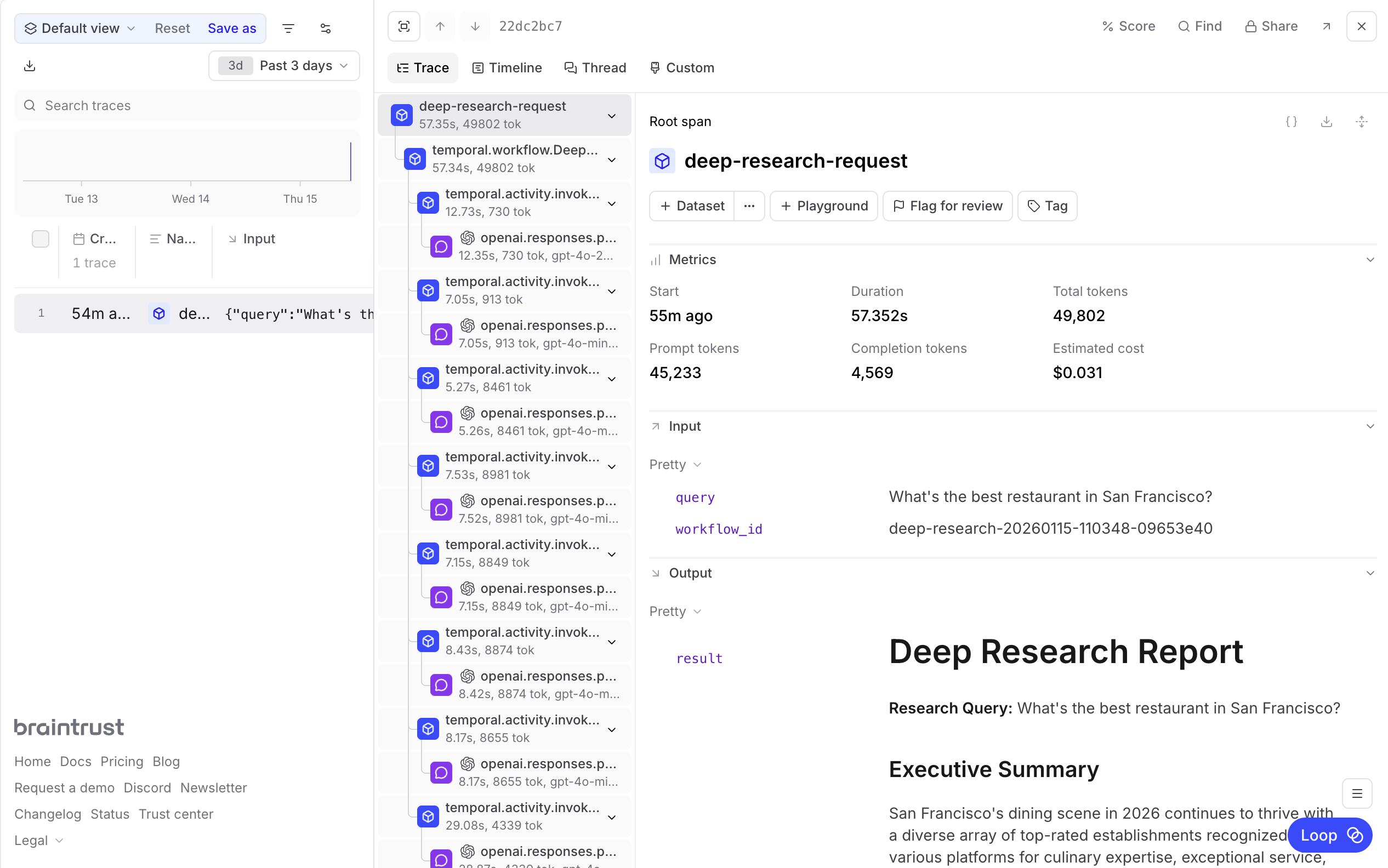
Multi-agent systems like deep research are notoriously difficult to debug. When a report contains incorrect information, you need to trace back through the planning, query generation, and search phases to understand what went wrong. Did the planner miss a key aspect? Did a search query return irrelevant results? Did the synthesis agent misinterpret the findings? With theBraintrustPlugin, you get automatic tracing for every workflow and activity execution. It captures the full execution graph, including parallel searches and retries:
invoke_model activity wraps the OpenAI client with Braintrust for detailed LLM call tracing:
- The research plan generated by the planning agent
- Each search query and its rationale
- Web search results with relevance scores
- The final synthesized report
Next steps
- Explore your research traces in Braintrust logs
- Learn more about evaluating agents and measuring performance
- Build datasets from your traces to improve agent prompts
- Read more about Temporal workflows